
Author: Raymond Adijanto

  • WSST Workshop resource: Thematic Analysis

    Instructions

    1. Open your preferred AI tool
    2. Copy the prompt and attached provided answer key and student responses file
    3. Run the prompt, and read the output

    Try it!

    1. Use the same prompt, but use your assessment’s answer key and student response file
    2. Try: adjust the prompt and re-run it, does the insights get better?
    3. Try: ask follow-up questions, did you get more relevant insights?

    Resources

    Inputs for generating personalized feedback on student writing.

    Resource drive link

    Student Instruction: 
    Q1. How do non-cancer cells become cancer cells? Your explanation
    
    Answer key:
    Look-for:
    Cells go through a cell cycle.
    A lot happens during the cell cycle: cells grow, chromosomes double, and the cell divides during mitosis.
    When a non-cancer cell divides into non-cancer cells, the new cells are identical: their chromosomes are the same.
    When a non-cancer cell divides into a cancer cell, something is different about the chromosomes.
    The cell cycle has checkpoints.
    When a cell skips a checkpoint, it becomes cancerous.
    Checkpoints work when there is a functioning/working p53.
    Cells skip checkpoints when there is a non-functioning/non-working p53.
    
    Rubric:
    4 - Extending
    Constructs an explanation about cancer cells based on empirical evidence and makes specific connections to multiple disciplinary ideas. Cites specific evidence from multiple class activities.
    
    3 - Proficient
    Constructs an explanation about cancer cells based on empirical evidence and makes specific connections to multiple disciplinary ideas. Cites specific evidence from class. (Don’t use words like more or a lot.)
    
    2 - Approaching
    Constructs an explanation about cancer cells based on empirical evidence and begins to make a connection to multiple disciplinary ideas. References evidence from class (without citing specific data)
    
    1 - Beginning
    Constructs an explanation (including interactions) to describe cancer cells with minimal reference to empirical evidence.
    
    
    Example:
    Cancer cells form when p53 is not working in the cell cycle. Normally, cells grow, make new chromosomes, and divide, and p53 checks to make sure it has everything it needs before it divides. If it is not working correctly, the cells that get made do not have everything they need but get made anyway. They are different because they have different chromosomes.
    

    Workshop Takeaways

    Generated themes may differ with each run even when using the same data


    Run the prompts a few times and pick the themes that commonly come up. Check against your instincts on student work!

    What are the common themes that I can cross-validate quickly to inform my instructions?

    Different models (e.g. Gemini vs ChatGPT) give different output formats


    This might even happen with the same model! Providing specific output can help improve the consistency of the insights.

    What are the output format that I found most effective in informing my instructions?

    Insights can be presented without showing student work


    Prompting the AI to show student work exemplars, and reviewing student work can ground your perspective and help you identify which insights are more useful.

    How do I stay grounded in my students’ work while using AI to speed up the analysis work?

    Their instructional coach Rachel shares what changed when teachers could finally see past the writing to what students actually understood.

    Meet the Presidential Award-winning science teacher who built Eddo and why 20 years in the classroom led him here.
  • WSST Workshop resource: Personalized Feedback

    Instructions

    1. Open your preferred AI tool
    2. Copy the prompt and the provided answer key, and copy the student response of your choice
    3. Run the prompt, and read the output

    Try it!

    1. Use the same prompt, but use your assessment’s answer key and your student’s response
    2. Try: adjust the prompt and re-run it, what did you see?

    Resources

    Inputs for generating personalized feedback on student writing.

    Resource drive link

    Student Instruction: 
    
    Question 1a. Do all solid objects deform during a collision? Claim
    
    Question 1b: Evidence
    
    Question 1c: Reasoning
    
    Answer key:
    
    Question 1a: Claim
    
    +The claim directly answers the scientific question.
    
    +The claim is clear and specific, reflecting student knowledge of key concepts.
    
    Question 1b: Evidence
    
    +Provides relevant evidence.
    
    +Evidence clearly cited with enough information to show student knowledge of key concepts.
    
    Examples of evidence possible:
    
    1 - A moving car collided with a stationary car, causing visible damage.
    
    2 - A moving golf club hit a golf ball, and the ball squished on impact.
    
    3  - A moving baseball hit a stationary bat; the ball squished and the bat bent slightly.
    
    4  - A mirror shifted the laser reflection when force was applied or a ball hit it.
    
     5 - A cement beam bent when pressure was applied by a plunger or machine.
    
    (Question 1a and Question 1b total: 8 points)
    
    8 points: All three are included and thorough.
    
    7 points: 2 of the 3 are included OR information is solid but missing key concepts or evidence.
    
    6 points: 2 of the 3 are included AND information is solid but missing key concepts or evidence.
    
    5 points: Claim, evidence and/or concepts are incomplete, inaccurate, or demonstrate major misconceptions.
    
    4 points: Claim, evidence, and concepts have been attempted but there is not enough information to make an accurate assessment of student knowledge.
    
    0 points: Nothing in this section has been completed.
    
    Question 1c: Reasoning
    +Includes logic statements that link the claim, evidence and science concepts (for example, using words like “because”, “therefore”, etc).
    +Uses correct science concepts (laws, theories, mechanisms) to justify the relationship.
    +Clearly explains the cause-and-effect link between claim and evidence.
    
    (Question 1c total: 8 points)
    
    0 points: Reasoning has not been attempted.
    
    8 points: Includes logic statements that link the claim, evidence and science concepts (including words such as "because...", "therefore...") that clearly demonstrates logical reasoning.
    
    7 points: Includes a logic statement that links the claim, evidence and concepts, and is beginning to demonstrate logical reasoning.
    
    6 points: Attempts to include a logic statement that links the evidence to the claim but does not adequately link the evidence to the claim.
    
    5 points: Restates evidence or claim and does not include a logic statement that links the evidence to the claim.
    
    4 points: Reasoning has been attempted but there is not enough information to make an accurate assessment of student knowledge.

    Question 1a. Do all solid objects deform during a collision? Claim:
    All solid objects deform during collision

    Question 1b. Evidence:
    Baseball & bat, golf club & ball, moving cars

    Question 1c. Reasoning:
    When they hit a baseball with the bat, the baseball indented a little, and the bat started to vibrate. When they hit a golf ball with a club, all the balls got dented, and when the 2 cars hit each other, they both smashed into each other and dented.

    Workshop Takeaways

    AI can generate a lot of feedback but requires curating for effective student learning


    AI does not know the students as well as the teachers do! Choosing and editing the feedback makes it more relevant to the students.

    What are some ways to curate the feedback so it’s meaningful to the students?

    Feedback with guiding questions, quoted student work, and adjusted reading levels are motivating


    Students who received the personalized feedback found them useful, especially knowing what to keep and what to fix.

    How would you incorporate AI in your workflow to generate personalized feedback?

    AI, with more structured prompts, can help with a lot of tasks


    Our hands-on shows AI evaluating text, handwriting, and drawings. Some teachers tested with additional task context and saw a more personalized feedback.

    How would you structure your prompt so the AI output is useful to you and your students?

    Their instructional coach Rachel shares what changed when teachers could finally see past the writing to what students actually understood.

    Meet the Presidential Award-winning science teacher who built Eddo and why 20 years in the classroom led him here.

  • Eddo July Update – Teacher Tools in Motion

    Dear Friends of Eddo,

    We have been cooking some fun stuff over the past few months and here’s some exciting ones we’d like to share with ya’ll for the summer!

    Introducing the Eddo Workspace

    After wrangling with various use cases and pilots, we’ve found a sweet spot that supercharges teachers in their assessment feedback

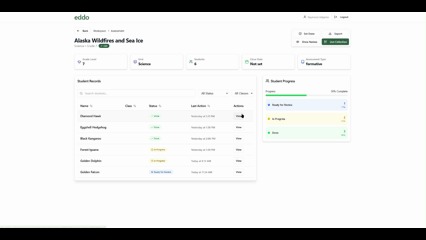
    The Eddo Workspace is a platform that supports administrators and teachers in their adoption of OpenSciEd, assisting in time-intensive teacher tasks through technology. You can access our demo to explore how this supports teachers’ assessment evaluation work. 

    Mark your calendar! We will launch the beta version at the end of August ‘25, ready for the next academic year pilots. 

    Additional features coming up:

    • List of assessment materials from OpenSciEd units, editable to your school’s instructions and rubric
    • Feedback customization and sharing through PDF or email

    Our work with Wauwatosa: supporting assessment feedback

    This past year’s collaboration with Wauwatosa led to a successful OpenSciEd pilot and we are excited to extend this collaboration into the next academic year. We’ve have also collaborated and submitted an SBIR grant to help scale this work 🤞🏽.

    Interested in pilots and working with us? We’d love to connect!

    We are planning for an informal session on pilots and our workspace. Join us! Reach out to howdy@eddolearning.com

    Interesting challenges we have wrangled with: 

    • Giving teachers insights and resource access with Digital Teachers’ Edition
    • Answering questions and surfacing relevant materials through Teacher Assistant Chatbot for 30+ teachers

    We are grateful to be building this work alongside educators, and every connection helps us keep the focus where it belongs: empowering educators to co-create world-class, innovative instruction.

    Thank you, as always, for being part of our learning community.

    Team Eddo

  • Kicking off the school year with eddo

    Dear Friends of Eddo,

    We are jumping headfirst into the new school year with exciting news: the beta launch of Eddo Workspace! Starting this fall, our pilot teachers and coaches will use Eddo Workspace for selected assessments to give students timely, actionable feedback while their learning is still fresh.

    Eddo Workspace is now live!

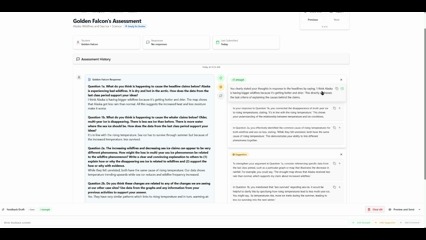
    You saw a glimpse of our vision before. Now, our pilot teachers can share timely, actionable feedback with students to deepen their formative learning, assisted by the evaluations generated in the workspace for written explanations and assessment tasks. 

    Instantly generate evaluations with strengths-based feedback and suggestions

    Compose downloadable, student-specific feedback quickly

    Curious how eddo workspace could support your classroom or coaching? Reach out to us at aw@eddolearning.com, we’d love to explore together.

    Assessments: More than just a grade

    A theme we hear in our conversations with teachers is their need to know where their students’ sense-making is at but that time and materials are stacked against them. 

    Teachers are coming up with creative ways to capture student progress, such as: 

    • More frequent multiple-choice exit tickets
    • Claim-Evidence-Reasoning (CER) assessments

    We are actively exploring how we can support teachers in our pilots.

    How do you capture your student’s sense-making? Share your approach in this quick survey!

    Other updates

    Website refresh: eddolearning.com is getting a glow-up – stay tuned for the launch

    October workshop: We’ll host a session on how teachers have used eddo workspace for assessments. We’d love your input on what topics would be most valuable.

    SBIR grant update: While we weren’t selected in this round, we’ll get detailed reviewer feedback–exactly what we need to keep iterating on the teacher tool that truly supports student-centered learning.

    This moment marks an exciting milestone: Eddo is shaping into a practical and effective tool that helps educators co-create world-class, innovative instruction.

    Thank you, as always, for being part of our learning community.

    Team Eddo