Author: Matt AW

  • Kick-Starting Formative Feedback with AI: CERs and Formative Assessment for OpenSciEd

    Last week, we hosted a Coaching ScienceLast week, we hosted a small Coaching Science Lab with educators, instructional coaches, and district leaders to explore a simple, open-ended question:

    What becomes possible when we use everyday AI tools to look more closely at student thinking—without changing who’s in charge of instruction?


    Experiences from the classroom

    Val shared how she used student drawings and explanations from the OpenSciEd Grade 8 Sound Waves unit to better understand student thinking, generate feedback more efficiently, and decide what to teach next.

    Val’s classroom workflow:

    • student work as the starting point
    • generated feedback in the form of strengths and questions to push learner forward
    • AI support enabled her to provide feedback that directly referenced their work, and to do it a lot faster than would have been possible otherwise

    Students loved specific, concrete feedback.


    Using everyday AI tools on purpose

    For the hands-on, we practiced student feedback using off-the-shelf AI tools like ChatGPT, Claude, and Gemini to show how you can get started without any special tools.

    Participants could see exactly:

    • how to prompt the AI with student instructions, reviewer instructions, and student work
    • what the AI produced
    • how to chat with the AI to go deeper

    This demystified the AI and showed how it can be used for really helpful analysis on real student work.

    The real leverage wasn’t the tool.
    It was the thinking around:

    • what counts as evidence in student work
    • what feedback actually helps students improve
    • what patterns matter for coaching and planning

    AI simply helped us move through that thinking faster.


    Teacher judgment stays at the center

    A strong theme throughout the session was role clarity.

    Participants resonated with an approach where:

    • teachers review and revise all feedback
    • tone and instructional intent remain human
    • AI suggestions are visible, editable, and contextual
    • patterns support coaching conversations rather than replace them

    The framing that stuck was simple:

    Teachers hope to engage students in deeper, more feedback.
    AI helps teachers do that work more often, with less friction.


    An invitation, not a conclusion

    Participants in the Coaching Science Lab session showed creativity and curiosity, encouraging us to create more opportunities for shared practice around real student work.

    We’re excited to continue learning and doing together.


    Want to explore this yourself?

    If you’re curious to try this approach in your own context, we’ve shared two lightweight entry points:

    This is a great a place to start exploring.


    We’re continuing to host small Coaching Science Labs as spaces to test ideas, learn from real classrooms, and figure out what responsible, useful AI support can look like in practice.

    If you’re interested in joining a future session—or just trying this on your own—we’d love to learn alongside you. Browse or subscribe to our calendar to join us for upcoming events.
  • How to: Generate instant CER student feedback with ChatGPT, Claude, or Gemini

    How to Generate Instant CER Student Feedback

    Using ChatGPT, Claude, or Gemini

    This one-page guide shows how teachers and coaches can use everyday AI tools to generate meaningful, curriculum-aligned feedback on student Claim-Evidence-Reasoning (CER)—without giving up instructional judgment or adopting new platforms.

    This approach was explored in a recent Coaching Science Lab with classroom teachers, instructional coaches, and district leaders using real student work from OpenSciEd classrooms.


    What problems this helps solve

    Providing high-quality, timely feedback on CERs is powerful—but time-intensive.

    Teachers often want to:

    • respond to student thinking, not just correctness
    • surface strengths and next steps tied to evidence and reasoning
    • use patterns in student work to guide instruction

    AI can help with the first pass—so teachers can focus on decisions, relationships, and next-day teaching.


    What you need

    You can do this today with:

    • Student work (text, drawings, photos, or screenshots)
    • Student instructions (the prompt students responded to)
    • A CER framework or rubric
    • Any general-purpose AI tool, such as:
      • ChatGPT
      • Claude
      • Gemini

    No special software required.


    The basic workflow

    1. Start with the student task
      Paste the question, prompt, or instructions given to students.
    2. Add reviewer guidance
      Tell the AI how to look at CER:
      • what counts as a strong claim
      • what evidence should reference
      • what reasoning should explain
    3. Include the student work
      Paste text or describe/upload an image or drawing.
    4. Ask for formative feedback
      Request feedback that highlights:
      • strengths in the claim, evidence, and reasoning
      • questions or suggestions that would help the student improve
    5. Review and revise
      Teachers edit tone, accuracy, and instructional intent before sharing.

    What the AI is (and isn’t) doing

    AI helps with:

    • noticing patterns
    • drafting feedback language
    • connecting feedback to evidence in student work

    Teachers remain responsible for:

    • instructional decisions
    • tone and relationships
    • what feedback students actually receive

    The AI is a thinking partner, not the teacher.


    Why this works for coaching and planning

    When used across a set of student responses, this same approach can:

    • surface common strengths and gaps
    • identify leverage points for next-day instruction
    • support coaching conversations grounded in evidence

    Instead of starting with scores, teams start with student thinking.


    Try it yourself

    To get started, we’ve shared two lightweight resources:

    You can experiment with one student response—or a whole class set—in under 10 minutes.


    Want to go deeper?

    We’re continuing to host Coaching Science Labs where educators and leaders explore real student work together, test ideas, and reflect on what responsible AI use can look like in practice.

    If you’re curious, you’re invited to explore alongside us.

  • CER Feedback AI Prompt Example

    Copy this prompt into an AI tool of your choice (chatgpt.com, claude.ai, gemini.google.com)

    ## Reviewer Instructions
    [Role and responsibilities]
    You are a teacher evaluating a CER (Claim, Evidence, Reasoning) assessment. Read the student response below and provide feedback. Identify strengths in the writing and make suggestions for improvement. Make specific connections between student writing and the task criteria. 
    
    [Context]
    This assessment is made up of 3 parts in response to a scientific question. The 3 parts are: Claim, Evidence, Reasoning. The claim has a correct answer and typically reflects the scientific concept. The evidence are data to support the claim.  
    Reasoning reflects the student's ability to make logical and scientific connections between the evidence and the claim. 
    
    [Instructions]
    1. Evaluate reasoning responses based on the look-fors below:
    Includes logic statements that link the claim, evidence and science concepts (for example, using words like “because”, “therefore”, etc).
    Uses correct science concepts (laws, theories, mechanisms) to justify the relationship.
    Clearly explains the cause-and-effect link between claim and evidence.
    
    2. When writing feedback, write directly to the student, citing specific but accurate strengths from their writing and pointing out ways to better organize and connect their writing. (i.e. "You provided strong evidence for... by stating that...") Use only verbatim examples from the student's writing. DO NOT MAKE ANYTHING UP. 
    
    3. Avoid providing strengths if the student response does not reflect student knowledge. 
    
    4. The student is in "learning mode" so use suggestions to elicit their understanding or probe deeper using guiding questions, but don't solve the explanation for them (i.e. Socratic style). Use clear and concise language and an encouraging, supportive tone. 
    
    5. Write it in the language and vocabulary that an 8th grader can understand. Avoid using scientific jargon. 
    
    6. Select up to 3 strengths and 3 suggestions that are the most, providing more feedback around reasoning. 
    
    The questions are: 
    Question 1a. All solid objects do bend or change shape when pushed in a collision. 
    Question 1b. Evidence
    Question 1c. Reasoning
    
    The student’s response are:
    Question 1a. All solid objects do bend or change shape when pushed in a collision. Question 1b. Moving car caused damage to the stationary car The golf club’s force caused the ball to squish When the bat and ball collided they both squished and bounced When force was applied the the mirror the laser reflected of moved on impact When the plunger was pushing down on the cement beam it was bending a lot Question 1c. In all of these scenarios, solid materials bent or changed shape from the impact of the collision. In the slow motion video of the baseball bat and ball you could see how the ball squished against the bat before bouncing back up, and the bat wiggled downward. Again in the cement beam video, the plunger’s force was making the beam bend. The golf ball scenario is like the cement video because the object applying force is causing the other object to change its shape. Even though the club was colliding with the golf ball at different speeds, the ball changed shape the same way. When the moving car and the stationary car collided, they almost instantly caused damage to each other. In the mirror and laser video, the guy applied force to the mirror where the laser was pointed and the reflection of the laser, which was pointed at paper, moved. That means that the mirror bent when the force was applied. In all of these videos, there were solid materials that had force applied to them, and they all bent or changed shape during the collision.  
     
    
    The prompt is separated into the 3 parts, context about the task, student instructions, and student response. 
    Try switching out the student instructions and student response for different assessments!
    
    1. Context about the task
    [Role and responsibilities]
    You are a teacher evaluating a CER (Claim, Evidence, Reasoning) assessment. Read the student response below and provide feedback. Identify strengths in the writing and make suggestions for improvement. Make specific connections between student writing and the task criteria. 
    
    [Context]
    This assessment is made up of 3 parts in response to a scientific question. The 3 parts are: Claim, Evidence, Reasoning. The claim has a correct answer and typically reflects the scientific concept. The evidence are data to support the claim.  
    Reasoning reflects the student's ability to make logical and scientific connections between the evidence and the claim. 
    
    [Instructions]
    1. Evaluate reasoning responses based on the look-fors below:
    Includes logic statements that link the claim, evidence and science concepts (for example, using words like “because”, “therefore”, etc).
    Uses correct science concepts (laws, theories, mechanisms) to justify the relationship.
    Clearly explains the cause-and-effect link between claim and evidence.
    
    2. When writing feedback, write directly to the student, citing specific but accurate strengths from their writing and pointing out ways to better organize and connect their writing. (i.e. "You provided strong evidence for... by stating that...") Use only verbatim examples from the student's writing. DO NOT MAKE ANYTHING UP. 
    
    3. Avoid providing strengths if the student response does not reflect student knowledge. 
    
    4. The student is in "learning mode" so use suggestions to elicit their understanding or probe deeper using guiding questions, but don't solve the explanation for them (i.e. Socratic style). Use clear and concise language and an encouraging, supportive tone. 
    
    5. Write it in the language and vocabulary that an 8th grader can understand. Avoid using scientific jargon. 
    
    6. Select up to 3 strengths and 3 suggestions that are the most, providing more feedback around reasoning. 
    
    
    ## Student Instructions
    Question 1a. All solid objects do bend or change shape when pushed in a collision. 
    Question 1b. Evidence
    Question 1c. Reasoning
    
    ## Student Response
    Question 1a. All solid objects do bend or change shape when pushed in a collision.
    
    Question 1b.
    Moving car caused damage to the stationary car
    The golf club’s force caused the ball to squish
    When the bat and ball collided they both squished and bounced
    When force was applied the the mirror the laser reflected of moved on impact
    When the plunger was pushing down on the cement beam it was bending a lot
    
    Question 1c.
    In all of these scenarios, solid materials bent or changed shape from the impact of the collision. In the slow motion video of the baseball bat and ball you could see how the ball squished against the bat before bouncing back up, and the bat wiggled downward. Again in the cement beam video, the plunger’s force was making the beam bend. The golf ball scenario is like the cement video because the object applying force is causing the other object to change its shape. Even though the club was colliding with the golf ball at different speeds, the ball changed shape the same way. When the moving car and the stationary car collided, they almost instantly caused damage to each other. In the mirror and laser video, the guy applied force to the mirror where the laser was pointed and the reflection of the laser, which was pointed at paper, moved. That means that the mirror bent when the force was applied. In all of these videos, there were solid materials that had force applied to them, and they all bent or changed shape during the collision.


  • Analyzing Student Work

    Analyzing Student Work

    Accelerating Coaching & Collaboration with AI: Supporting OpenSciEd Biology in Wauwatosa

    Featuring district-wide OpenSciEd implementation with a spotlight on High School Biology

    In our inaugural workshop, we explored how Wauwatosa educators are using AI to improve science instruction and equity. They’ve seen measurable gains in mastery—especially among Black students—through untracked classes and rigorous, NGSS-aligned instruction with OpenSciEd.

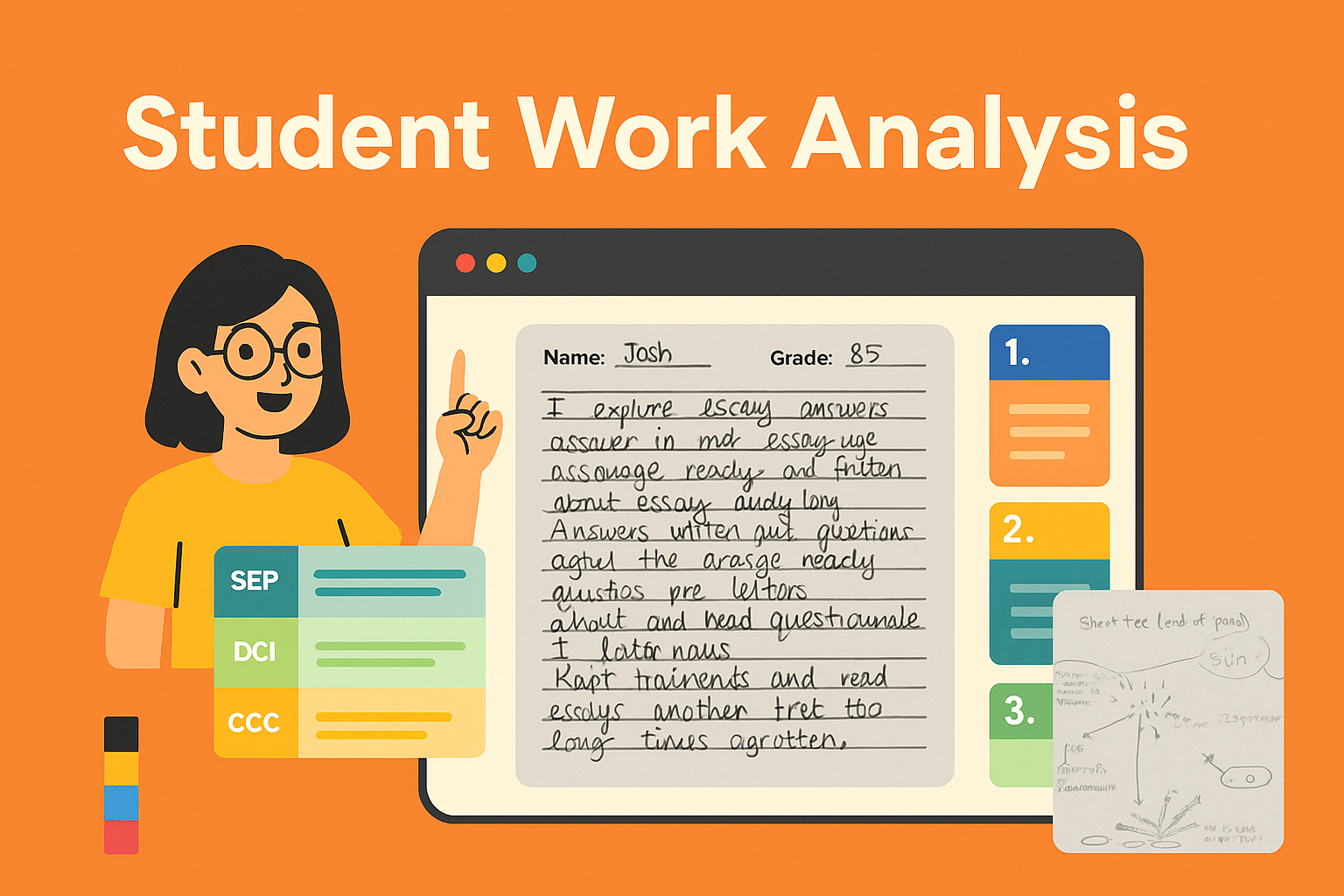
    We shared a mini-app we co-created that uses AI to:

    • Support teacher discussion and norming
    • Analyze student writing (even from scanned handwriting)
    • Provide instant, rubric-aligned feedback
    • Surface strengths and areas for growth

    💬 Teachers shared: “This made my feedback better.” “It helped me see through the writing to what students understood.”


    Workshop Highlights:

    • ​How Wauwatosa used AI to support teacher collaboration and instructional coaching
    • ​A walkthrough of tools designed to generate real-time feedback aligned to OpenSciEd Biology
    • ​Practical takeaways for supporting system-wide implementation through PLCs and coaching models.
    Download Slides

    ​Presenters:

    Sarah Blechacz, Ed.D., K-12 Science Curriculum Coordinator

    Rachel Duellman, M.Ed., Instructional Coach

    ​Wauwatosa School District, Wauwatosa, WI

    Matthew Anthes-Washburn, M.A.T., Eddo Learning co-founder


    Accelerating Coaching & Collaboration with AI: The Wauwatosa Story

    In Wauwatosa School District, science leaders Sarah Blechacz and Rachel Duellman have been working to implement OpenSciEd with a coaching-centered model and a strong emphasis on data-driven equity. Their early outcomes show measurable gains in mastery for Black students, without sacrificing progress for others.


    🏫 The Wauwatosa Journey

    Wauwatosa Public Schools has been deeply engaged in a multi-year adoption of the OpenSciEd curriculum. Their approach is supported by coaching and collegial inquiry .

    Key milestones:

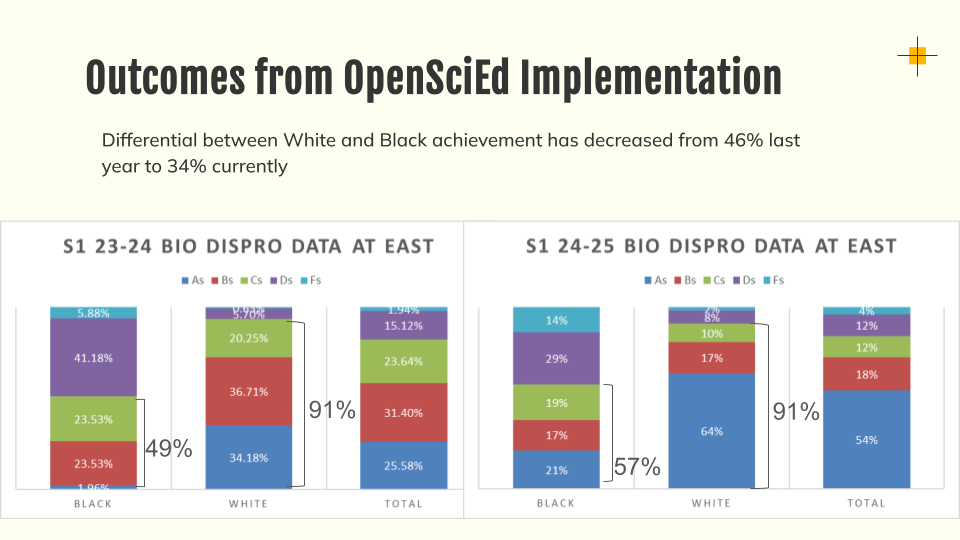
    • Equity-focused implementation: Mastery among Black students grew from 49% to 57%.
    • Detracked courses: Removed “advanced” biology and chemistry tracks to provide rigorous learning for all students.
    • Instructional shift: Tasks now emphasize modeling, design, and student-generated explanations.

    📈 Equity Gains in Student Outcomes

    Bar chart showing Black and White student grade distributions in high school biology at East High for two years. After OpenSciEd implementation, more Black students earned A–C grades, and the achievement gap with White students narrowed.
    After one year of OpenSciEd implementation, the percentage of Black students earning A, B or C grades in Biology rose from 49% to 57%, reducing the achievement gap with White students from 46% to 34%.

    🤖 Why Bring in AI?

    Wauwatosa’s teachers were seeing a huge increase in student writing—authentic, multi-paragraph explanations tied to rigorous phenomena—but it came with a cost: feedback and grading took much longer. Sarah and Rachel partnered with Eddo Learning to explore whether AI could help close that feedback loop faster and more equitably.


    🧠 Co-Designing AI Tools with Teachers

    The Wauwatosa team collaborated with Eddo Learning using a design thinking approach. They identified high-leverage teacher pain points, prototyped a feedback tool, and tested it with real student responses. The goal? Amplify what teachers are already doing and make high-quality feedback more accessible to students in real time.


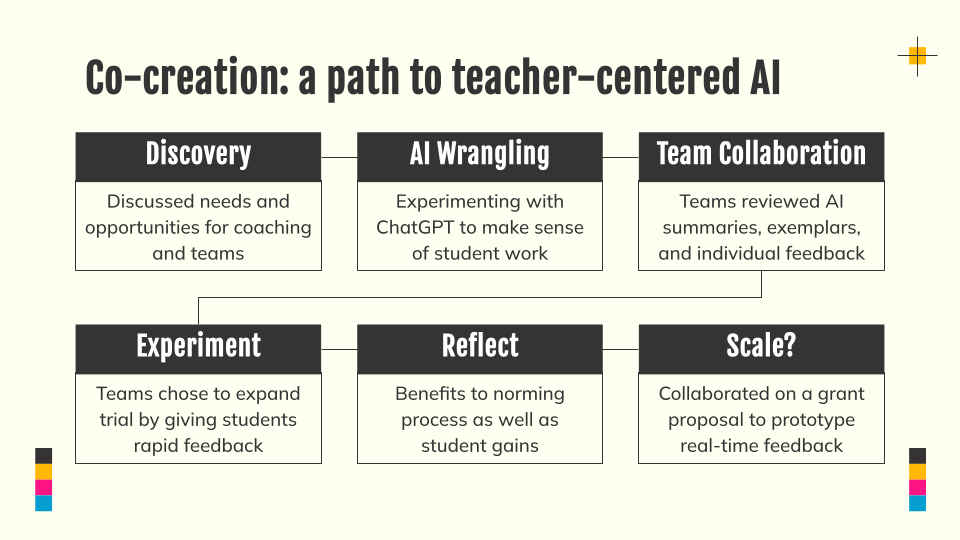
    Flowchart titled "Co-creation: a path to teacher-centered AI" with six steps: Discovery, AI Wrangling, Team Collaboration, Experiment, Reflect, and Scale? Each box describes an action taken by educators integrating AI into their coaching and feedback process.
    This co-creation process shows how educators collaborated to explore AI tools for student feedback. Starting from discovery and AI experimentation, teams reflected on student impact and proposed scaling the work through a grant.

    💬 What the AI Did

    The prototype AI assistant analyzed student writing samples, provided rubric-aligned strengths and suggestions, and helped teachers spot class-wide trends. One teacher noted that seeing the AI’s language helped improve her own feedback to students. Others used it to norm grading more effectively across PLCs.


    🛠️ Try It Yourself

    Curious to see what’s possible? Visit apps.eddolearning.com and explore the “Analyze Student Work” tool. You can upload student writing, view AI feedback, and even ask the data questions like “What misconceptions are most common?”


    🚀 What’s Next?

    The next workshop will focus on AI-supported lesson planning with OpenSciEd. We’ll explore what happens when ChatGPT already knows the curriculum and can help teachers visualize and pace a unit. If you’re interested in co-creating the next tool or leading a session, let us know!